Cold start and recovery: bringing a new machine back to work
A new machine, a second machine or a rebuild all follow one versioned seed in a fixed order. If verification fails, stop. Only signing in has to be done by a person.

Key points
- A new machine, a second machine or a rebuild all follow one versioned seed in a fixed order. If verification fails, stop. Only signing in has to be done by a person.
- Program, rules and data travel separately: the seed brings the platform back, data comes from the remote and an encrypted offline backup, and indexes are always rebuilt from files.
- Backups follow 3-2-1 and are actually restored every month. When something breaks, stop the damage first, decide where to resume, and let a fresh AI prove the workspace can be found.
Picture a Monday morning. You open your laptop and the screen stays black. Maybe the drive failed, maybe coffee got involved, maybe it's simply too old to start. You have a project due on Wednesday, three AI assistants moving different pieces of work forward, and a year of decisions, notes and files behind you.
The scary part usually isn't the machine. It's the question: how long until I'm back where I was last night?
For a lot of people the honest answer is "depends on luck". It depends on when the last backup ran, whether you remember which tools you installed and which settings you changed, and whether the AI assistants will recognise the workspace on a different computer. This article explains how we replaced "luck" with a process you can follow, rerun and check.
When most people think about backups, they think about copying files somewhere else. That matters, but if it's all you do, you'll still get stuck on the day you switch machines. A working environment is more than files.
It also includes which programs are installed and at which versions, where the rules live, which folders are managed, where an AI should start reading, and which data is too sensitive to sync freely. You don't see any of this day to day, because it's already there. You only notice you never wrote it down on the day it's gone.
When people and several AI assistants share one workspace, the problem gets sharper. A person can rebuild from memory, slowly. An AI has no memory of yesterday. A new AI conversation is like a colleague on their first day: all it has are the clues left in the workspace. If those clues only exist in an old conversation, or only on the machine that just died, it finds nothing.
So we treat starting over as a situation to design for in advance, not an accident to improvise around. The goal is simple: whether it's a brand-new computer, a second computer or the same one reinstalled, everything comes back the same way, and every step can be checked.
The seed: a versioned package you can rerun
We call the starting point of that path the seed. A seed is a versioned startup package containing what the platform needs to grow back on an empty machine: the platform program, the shared rules, and the signposts that help an AI find the platform.
A seed has three important properties.
- It has a version. Every seed carries a clear version number, so you know what you installed and can step back to the previous one if needed.
- It can be verified. The first thing you do with a seed is check its signature and checksum. If either fails, you stop. No "let's just try it".
- It can be rerun. Running the same seed twice on the same machine doesn't produce two copies of the platform or overwrite settings that already exist. If something fails halfway, fix the cause and run it again.
Rerunnable sounds like a small detail, but it's the part of the design that saves the most worry. Installs rarely go smoothly the first time. The network drops, a permission isn't granted, a step fails because the environment is slightly different. If every failure meant cleaning up half-finished leftovers by hand before trying again, people would start skipping steps, and skipped steps are where incidents come from. A process that can be rerun lets people try again without fear.
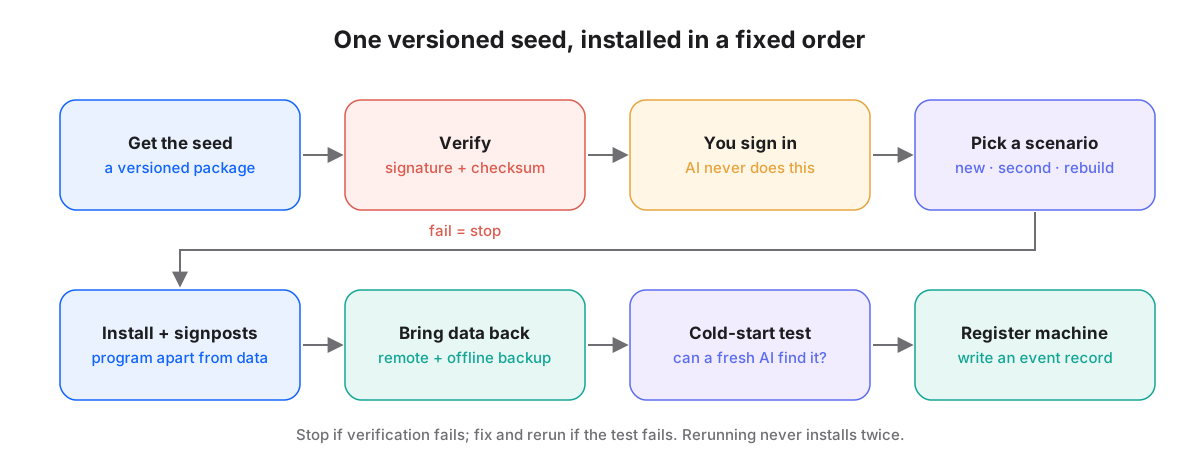
Only one step must be done by a person
The install order looks roughly like this. Get the seed and verify it. Sign in to your account yourself. Pick the scenario: new machine, second machine or rebuild. Give the machine a name. Install the platform and plant the signposts. Bring the data back. Finally, have an AI run the cold-start test, and if it passes, register the machine and leave an entry in the event record.
An AI can help with most of these steps. Signing in is the exception, and a person always does it. Not because an AI couldn't, but because signing in says who you are, and that identity shouldn't pass through any intermediary. The AI can prepare everything, stop at the sign-in screen and remind you what to do. The click itself is yours.
Picking the scenario is also worth a pause. New machine, second machine and rebuild all look like "install it", but they differ in where data comes from and what role the machine plays. The most sensitive data, for example, may be allowed on only one designated machine. In that case a second machine shouldn't fetch a copy once it's set up. Naming the scenario first tells every later step how far to go.
Getting data back: files are the source, indexes are recalculated
Once the data is back, one thing is easy to overlook: the indexes used for search and overviews.
In our design, files are the source of truth. The indexes, lists and status tables in the database are all calculated from the files. They aren't a second copy that needs syncing. On a normal day that can look like extra work. On the day you switch machines, it saves you.
Because the index is calculated, it doesn't need a backup and doesn't need to sync between machines. Once the new machine has the files, one scan rebuilds an index identical to the old one. If the index were also treated as a source, you'd have to worry about two sources disagreeing, about the backed-up index and backed-up files coming from different moments, and about which one to trust after a rebuild.
The same idea applies when two machines are working at once. Each machine rebuilds its own index from files, and only the files are synced. To stop both machines running the same tidy-up script and colliding, the script records "running" before it starts, and the other machine waits when it sees that mark.
3-2-1 backups, plus a real restore every month
Getting data back depends on it actually existing somewhere else. We use the common, plain 3-2-1 rule: at least three copies, on two different kinds of media, with one copy offsite.
- The first is a regular snapshot of the whole machine, so the system and its settings can return to a point in time together.
- The second is a daily snapshot on an external disk, dedicated to the main database, the event record and the file store.
- The third is an encrypted offsite cloud backup, so the data survives even if the whole building doesn't.
On top of that, every repository has a private remote. That isn't only a backup; it's also the normal way the two machines exchange work.
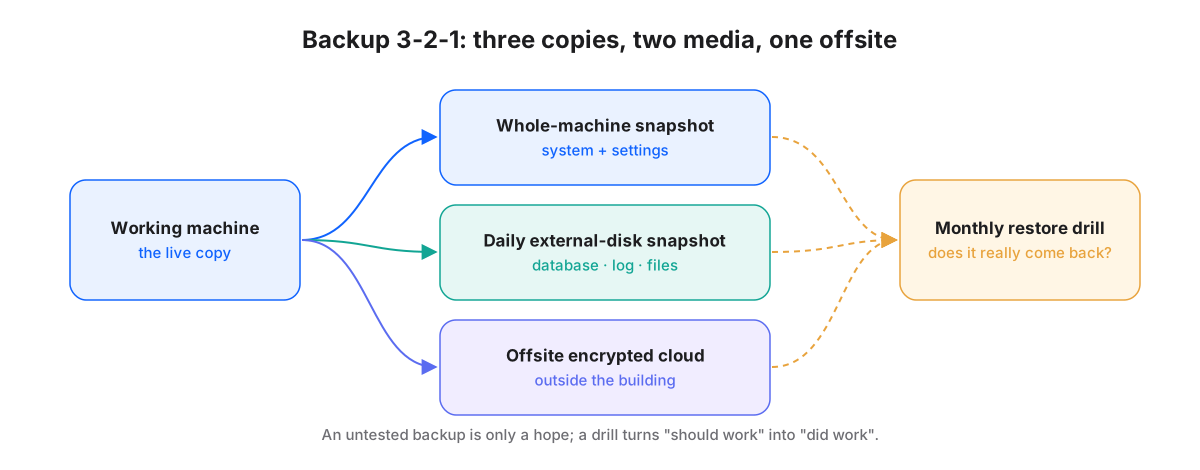
But 3-2-1 only answers "did we save it?", not "can we get it back?". Plenty of backups turn out, on the day they're needed, to have a missing encryption key, an unreadable format, or a folder that was excluded from the start. So we add one rule after 3-2-1: actually restore something every month.
The drill doesn't need ceremony. Pick a small slice of data, restore it to a different location using the real recovery steps, and open it to see whether it's complete and usable. The point isn't to prove the backup is perfect. It's to find, on a calm day, the problems that would otherwise only show up on a stressful one.
A backup you've never restored is just a reassuring assumption.
On the bad day: stop the damage, then choose where to resume
When something really breaks, the easiest mistake is rushing to fix it. We wrote recovery as a flow that decides first and acts second. The first question is always: could credentials have leaked?
If yes, rotate the affected credentials that same day and log it as a security event, then return to the main flow. This comes first because most losses can be made good slowly, while a leaked credential gets worse with time.
Next, the system drops to a "files plus manual" mode and pauses all automatic AI dispatch. That sounds like going backwards. It actually parks things in a safe state: the files are there and people can keep working, but automation doesn't keep acting inside an incomplete environment.
Only then comes the second question: are both machines unusable?
- If only one is down, continue on the other, aiming to be back to normal work within one workday.
- If both are down, or one has to be rebuilt, run the seed on a new machine and follow the install path above.
Either way, the steps that follow are the same. Bring data back from the remote and offline backups, restoring the most sensitive parts item by item from the encrypted copy. Rebuild indexes from files. Run the cold-start check. Only after it passes does AI dispatch resume.
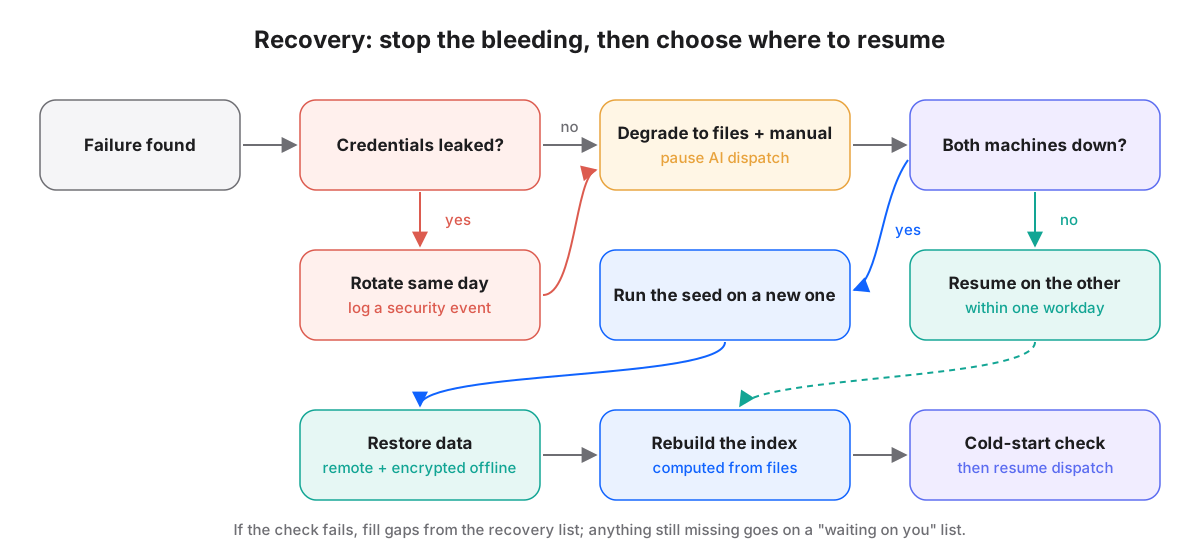
If the check fails, work through the recovery list item by item. Anything that can't be filled goes on a "waiting on you" list for a person to decide, rather than letting an AI guess a workaround. Once it's over, an event record is kept and a short review written, so what was learned goes back into the process.
The cold-start test: let an AI that knows nothing check the work
After all those steps, how do you know the machine is really back? Our check is a little unusual. We don't ask someone familiar with the environment to look. We ask an AI with no history at all.
Concretely, we open a brand-new AI conversation, give it no hints, and let it search the workspace on its own. It has to find where the platform is, where to read the rules, which pieces of work exist, and where each one stopped. We run this with more than one AI tool, because different tools look for things differently. Passing with one doesn't prove the signposts are clear enough.
The test works because it simulates the most common real situation. After a machine change, the first one to walk into the workspace is usually an AI with no memory of yesterday. If it finds its way, continuity doesn't depend on anyone's memory or on a private conversation. If it can't, something important only existed in the old environment, and now is exactly the time to turn it into a file.
Three small things to do on ordinary days
Cold starts and disasters look rare, but what makes them go smoothly is ordinary habit.
- Write decisions down as files. Important decisions, current progress and next steps belong in files everyone can read, not only in one conversation.
- Make settings regenerable. Anything that can be calculated from files shouldn't be maintained as a second copy by hand.
- Practise. A full recovery drill every quarter and a small restore every month mean the process has already been walked before it's needed.
None of these is hard. The hard part is keeping them up while everything works. So we put them into a fixed rhythm instead of hoping someone remembers.
In short
- New machine, second machine and rebuild follow the same path: a versioned, verifiable, rerunnable seed. Only signing in is done by a person.
- Program and data stay apart. The seed restores the platform; data comes from the remote and an encrypted offline backup; indexes are rebuilt from files, never kept as a second source.
- Backups follow 3-2-1 with a real restore every month. On a bad day, stop the damage and degrade first, then choose where to resume, and let an AI with no history confirm the workspace can be found.