How the interface standard controls colour and accessibility
Colour is audited, tokenised and checked: it must look good and be readable by everyone.

Key points
- Decide the role before the value: blue for primary action, yellow for attention, red only for errors.
- Light and dark themes come from the same tokens; body text needs at least 4.5:1 contrast, in both themes.
- Colour is never the only signal and motion respects reduced-motion; audit regularly: inventory, map to tokens, check contrast, fix.
How many colours does your interface use? Most teams cannot say. It starts with the brand blue, then a yellow for reminders, a purple that feels livelier, an orange added to one page so it "pops". Each choice made sense at the time; together they become a palette with no rules.
The cost is not only aesthetic. People stop being able to tell which button matters most or which message needs action, and anyone with weaker eyesight, reading a phone outdoors or using dark mode may not be able to read things at all. This post explains how we use tokens, contrast checks and regular audits to make colour something we can manage.
Colours are tokens with meaning
Our first principle: decide the role, then the value. Every colour in the interface has to answer the question "what do you stand for here?" If it can, it becomes a named token. If it cannot, it probably should not exist.
- Primary blue: the main action and key data, such as submit buttons, links and the most important figures.
- Yellow: attention, such as pending items or something due soon. It flags, but it does not mean something went wrong.
- Red: errors only, such as a failure or something that cannot proceed. Never decoration, never general emphasis.
- Green marks completion or success; ink and greys carry text, headings and lines.
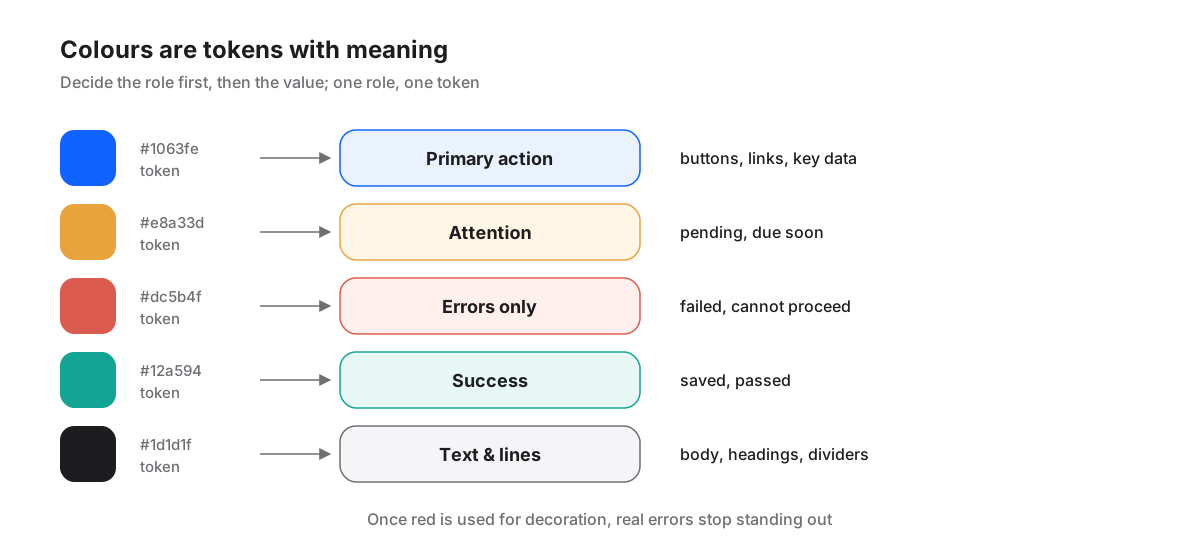
In code, components reference the token name, such as "primary action", never a raw colour value. Adjusting the brand blue then means changing one place, and a page that tries to slip in its own colour stands out immediately.
Token names matter too. We name them by role, such as "primary action", "attention" or "error", rather than "blue 1" or "bright yellow". A token named after its colour will sooner or later be used for something unrelated; a token named after its role reminds everyone, every time, what the colour is supposed to mean.
We also keep the number of tokens deliberately small. A handful of clearly defined roles, plus a few supporting colours for charts and illustrations, is enough for most screens. When someone wants to add a colour, the first question is always: does an existing role already say this?
Contrast: being readable is the minimum
A beautiful palette is not necessarily a readable one. Light grey on white or white on bright yellow can look refined in a design file and all but vanish on a phone in sunlight.
We follow the common accessibility standard: at least 4.5:1 contrast between body text and its background, and at least 3:1 for large text and non-text elements such as icons. It is a hard threshold, not a suggestion. Every token pairing is calculated before it is agreed, for example "white text on primary blue" or "dark text on the yellow attention background".
Sometimes that means one role needs two values: one for large background areas and one for text on top. Yellow is the classic case. Bright yellow makes a good attention background, but yellow text on white is nearly unreadable, so attention text uses a deeper ochre.
Light and dark themes from the same tokens
Dark mode is not simply inverting every colour. A blue that is crisp on white can look too dim, too harsh or too low in contrast on a dark background.
So components know only role names, and themes supply the values. In the light theme, "primary action" is the saturated brand blue; in the dark theme it becomes a lighter blue that stays just as clear on a dark surface. Each theme has to pass the contrast checks on its own; checking one side is not enough.
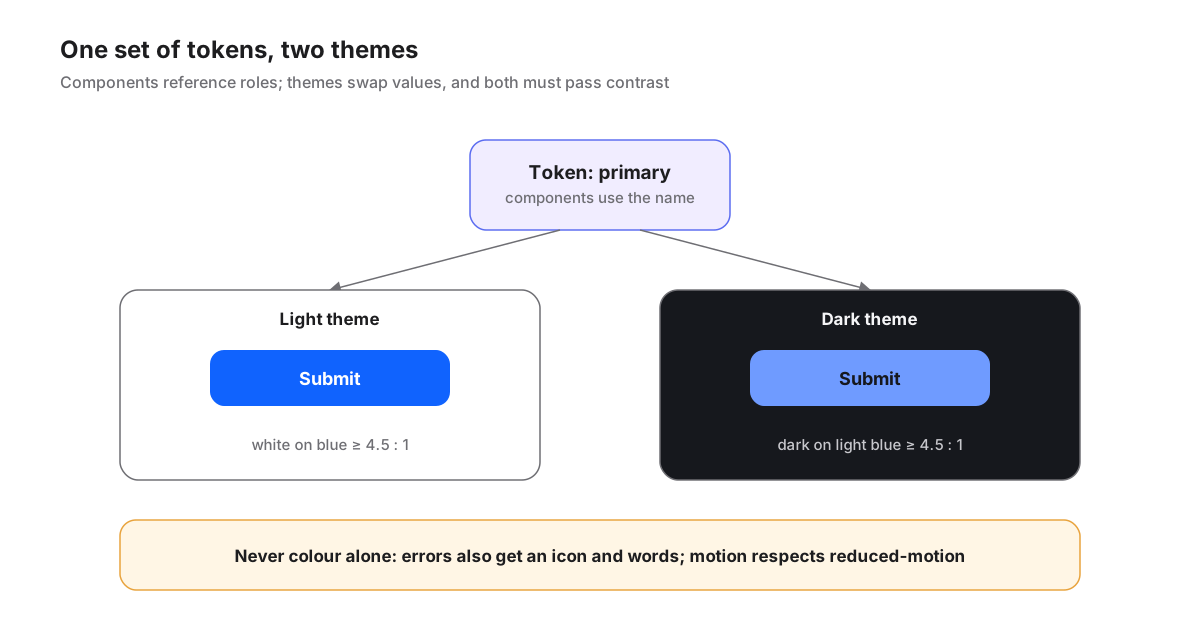
Colour is never the only signal
Some people cannot tell red from green; others view interfaces on greyscale screens or in harsh light. If an error is shown only in red, they will miss it.
- Error messages carry an icon and a written explanation, not just a red border.
- Chart series are distinguished by labels, shapes or line styles as well as colour.
- Required fields and the current page are marked by something other than colour.
Motion follows the same logic. Fades, slides and drifting colour fields can give an interface life, but for some people they cause discomfort. When someone turns on "reduce motion" in their system settings, our interface stops non-essential animation and content simply appears, with nothing lost.
Looking good is a bonus. Being readable by everyone is the pass mark.
Regular audits: inventory, map, check, fix
Writing the rules is the easy part; keeping them is harder. New pages, new components and new collaborators can all bring in a colour that is "just for this once". So we run a colour audit regularly, and the steps never change:
- Inventory: list every colour value actually used in screens and styles, without relying on memory.
- Map to tokens: assign each value to a role, and merge colours that are similar but not identical into a single token.
- Check contrast: calculate text-on-background contrast one pair at a time, in both light and dark themes.
- Fix: replace stray colour values with tokens, and record what changed and how it looked before, so it can be compared later.
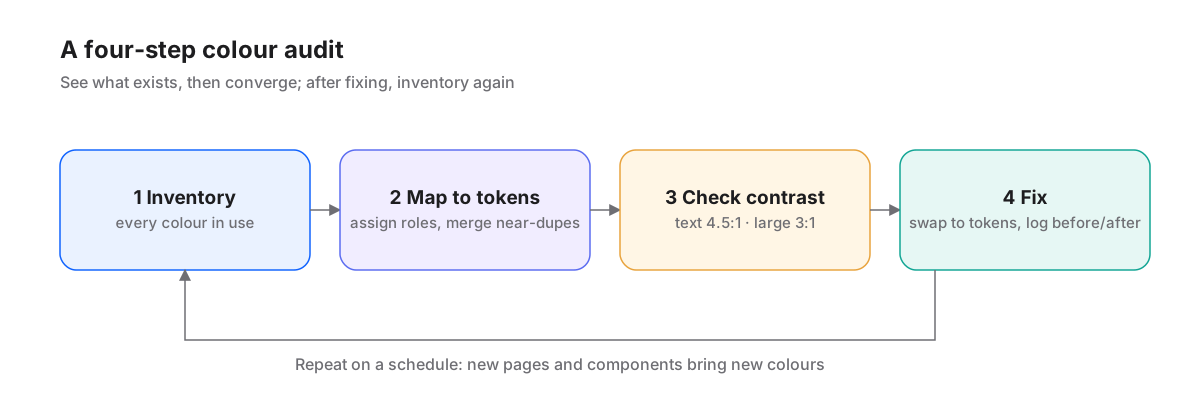
Audits often turn up surprises: a background that jumps out too much, a purple that is too saturated, two nearly identical blues living side by side. The rule at that point is to converge, not to add yet another colour.
An audit also needs to remember which colours are deliberately left alone. A third-party platform's logo colour, used only to label that channel, stays as it is, with a note explaining why; the identity colours of a fictional brand in example content belong to the story, not to the interface. Writing exceptions down means the next audit does not reopen the same debate, and nobody mistakes an exception for a new standard.
Finally, every audit leaves a record: which colours were found, which were merged, which pairings failed contrast and what the fix looks like. That record gives the next audit a baseline to compare against, and helps newcomers understand quickly why the interface looks the way it does.
In short
Colour is the part of an interface that drifts most easily and gets noticed least. Treat it as a system with roles, rules and checks, and you no longer have to choose between beautiful and readable.
- Decide the role before the value: blue is action, yellow is attention, red is for errors only.
- Body text needs at least 4.5:1 contrast, and both light and dark themes must pass.
- Colour is never the only signal, and motion respects reduced-motion settings.
- Audit regularly: inventory, map to tokens, check contrast, fix, and record the before and after.