Platform updates: small changes flow, big ones wait for people
Platform, services and applications each pin their own version and subscribe to a release channel. Updates move down one layer at a time; feedback moves back up.

Key points
- Platform, services and applications each pin their own version and subscribe to a release channel. Updates move down one layer at a time; feedback moves back up.
- When a new version ships, a shared protocol checks whether it touches any format downstream work relies on. If not, it's piloted on one or two tasks, rolled out once a health check passes, and rolled back in one step if it fails.
- Big changes that touch relied-on formats never apply themselves. They stop, land on a decision list with migration steps, and wait for a person's yes, and everything is recorded in an append-only log.
Imagine a tool you use every day that ships a new version every week. Sometimes it fixes a typo, sometimes it adds a feature, sometimes it changes the format of a field entirely. You probably don't mind the first two. The third can suddenly break work you have in progress.
Any platform that keeps improving runs into this. Change too slowly and everyone is stuck on old versions. Change too fast and the services and projects built on top break. This article explains how we let small changes flow down on their own while big ones stop and wait for people.
Three layers, each pinning its own version
We split the system into three layers. At the bottom is the platform: shared standards, scripts, the doors in and out, and a protocol everyone has to follow. In the middle are services, built on the platform and developed into services and products. At the top are applications, the places where things are actually used, such as the company's own setup or a version for clients.
Every layer writes down which version and which channel it follows. Think of it as a subscription form: when the platform ships something new, the system reads the forms to decide whether to send it, and to whom. The platform itself releases on channels, from development to pilot to stable, each more dependable than the last, and each layer picks the one it wants.
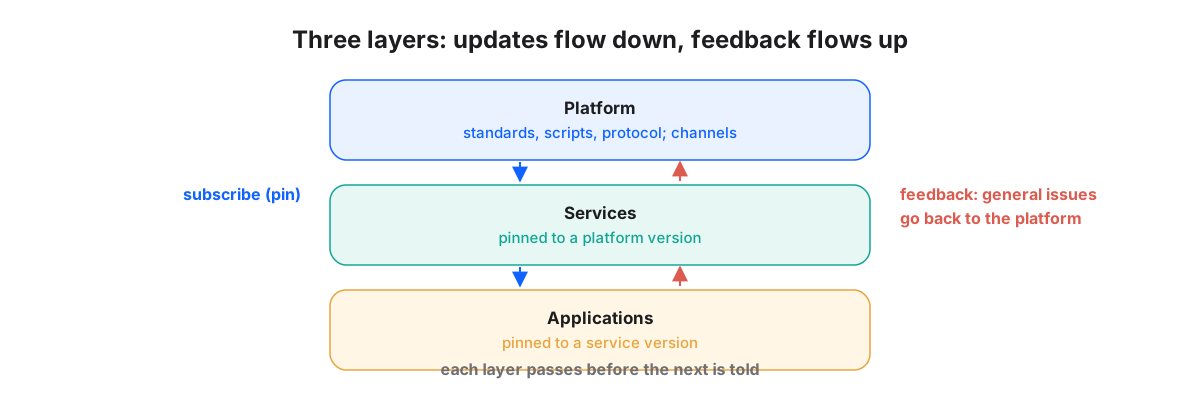
Feedback travels the other way. A problem found in use goes back to the platform if it's general. Settings that belong to one company stay in that company's own configuration. Anything specific to one product stays with the product. Sending feedback to the right place keeps the platform from being bent out of shape by one party's special needs.
There is really only one question
A new version has arrived. Should it apply itself? Instead of asking whether the change is big, we found it more useful to ask something sharper: "does this change a format I depend on?"
The answer comes from the protocol that runs through every layer of the platform. It defines what data looks like, how identifiers are built, how events are recorded and how permissions work. The protocol doesn't trigger updates. It guards them, comparing the new version against the formats downstream work currently relies on. If the release only fixes mistakes or adds new things, old usage is untouched and the update flows down. The moment it changes a relied-on format, it stops.
The path an update takes
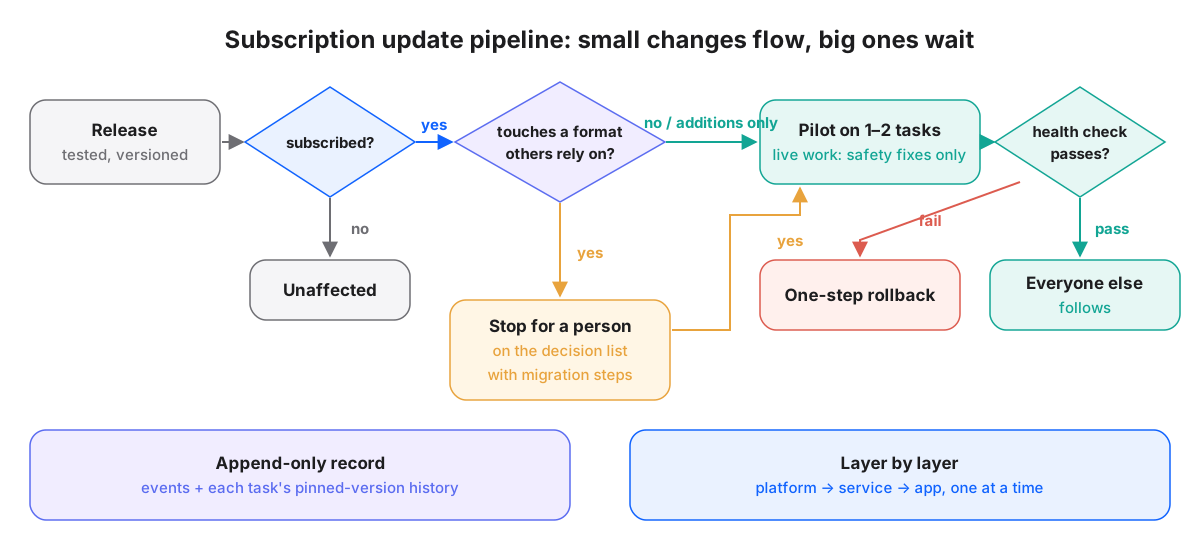
- Release: the platform passes its own tests, gets a version number and sends a new-version event to that channel's subscribers.
- Check the subscription: anything not subscribed to that channel is unaffected, and that's the end of it.
- Compare against the protocol: for subscribers, check whether the release touches a format they rely on.
- Pilot small changes first: if nothing relied-on changed, one or two tasks upgrade first as a trial. Client work that's actively being delivered only receives safety fixes, nothing else.
- Health check: the trial tasks must pass a health check, including having different AI tools each pick up the work from a cold start to confirm they can find the platform and read the rules. On a pass, everything else follows. On a fail, roll back to the previous version in one step.
- Big changes stop: if a relied-on format changed, nothing applies automatically. The change goes on the decision list with migration steps attached and only moves to a trial after a person says yes.
Why pilot on only one or two tasks? The point of a trial is to see problems where they cost the least. One or two tasks are enough to run real work end to end, and if something goes wrong only they need to roll back. Once they've run smoothly for a while, the rest follow, and the risk has been cut into a very small piece.
Every step is written to an append-only event log, and each task keeps the full history of its pinned versions. If an update is ever missed, the routine daily check catches it, so a single lost event never leaves something stuck on an old version forever.
One layer passes, then the next
Updates never flood everything at once. Services are told only after the platform has upgraded and passed its checks. Applications are told only after services have done the same. If a version has a problem, it stays contained at the top layer instead of spreading all the way to what clients are using.
The other principle is no reaching backward. Structures and defaults introduced by a new platform version apply to work opened afterwards. Work already underway keeps the structure it started with. Field formats that can be converted safely come with migration steps, but an update never uses the occasion to rewrite the skeleton of old work.
Rollback can be a single step precisely because every task keeps the full history of its pinned versions. The system knows exactly which version it followed before the upgrade, so going back means restoring the previous line on the subscription form, not someone reconstructing it from memory. Being able to step back safely is what makes it safe to try.
Changes need a rhythm too
Even when every update is safe, changes that come too often are hard to keep up with. So alongside the pipeline, we set a rhythm for what can change and when:
- Fixes: typos and obvious errors can be fixed any time, without touching existing work.
- Small changes: adjustments to rules or the meaning of fields are grouped into two fixed windows a year and need a person's sign-off.
- Big changes: larger changes to rules or fields go into two other fixed windows, also need sign-off, and are observed before being rolled out.
- Proposal deadline: any change has to be proposed two weeks before its window, so people have time to read it.
The point of a rhythm is predictability. You know a big change won't appear out of nowhere on an ordinary day, and you know when to raise one yourself. The system keeps getting better without asking people to relearn it every morning.
Let small changes flow on their own. Make big ones stop and wait for people.
In short
- Platform, services and applications each pin versions through subscriptions. Updates go down, feedback comes up, and only general issues go back to the platform.
- The protocol doesn't trigger updates, it guards them: no relied-on format changed means automatic, changed means stop.
- Small changes pilot on one or two tasks and roll out only after a health check, with one-step rollback on failure. Client work in delivery only gets safety fixes.
- Big changes wait for a person's yes with migration steps. Updates move layer by layer, never rewrite past work, are logged append-only, and are grouped into fixed windows.