How tags become a database and a knowledge graph
Every case carries eight groups of tags in its own folder — identity, classification, direction, status, relations, safety, platform and lifecycle — and that tag file is the record.

Key points
- Every case carries eight groups of tags in its own folder — identity, classification, direction, status, relations, safety, platform and lifecycle — and that tag file is the record.
- The database and the knowledge graph are both rebuilt from the tags by a program and can be deleted and regenerated at any time. AI checks the index first, then opens only the files it needs.
- Most tags are filled in by AI and scripts, but along three different update paths. Decisions such as goals, levels, exits and type are only ever suggested, and a person confirms them.
Say sixty projects are in progress and someone asks, "Which ones are waiting on the client and due this week?" If the only way to answer is to open each folder, a person loses an afternoon, and an AI has to page through them one by one — by the end, what it read first has been pushed out of its context.
Tags solve that. A tag is data about data: what this is, what kind it is, where it stands, what it relates to. This post explains how one ordinary tag file gives us both a database we can filter and a knowledge graph we can follow.
Eight groups, eight questions
Each case folder holds an identity file, and the tags live in it. They come in eight groups, and each group answers a different question.
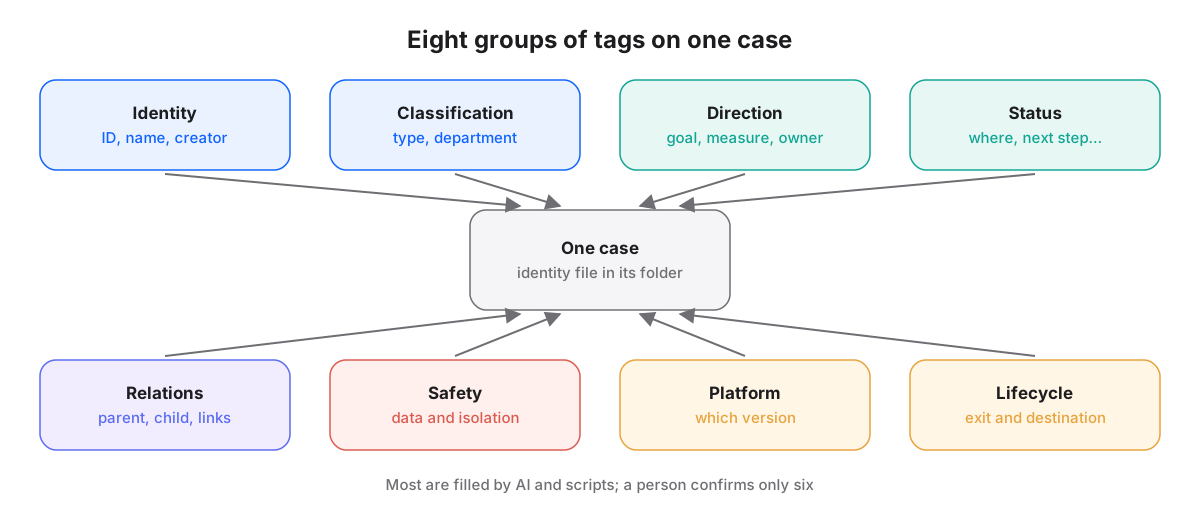
- Identity: what is this? ID, name, creation date and creator.
- Classification: what kind is it? Type of work, responsible department.
- Direction: what is it for? The main goal and how it is measured, other goals it serves, and who owns it.
- Status: how is it going? The stage, plus four fields — where it stands, next step, waiting on, due.
- Relations: what is it connected to? Parent and child cases, and links to other cases.
- Safety: how is it protected? Data level, isolation level, and whether it holds personal data.
- Platform: which platform version does it use? The subscribed version and any declared exceptions.
- Lifecycle: how does it end? Completed, transferred, archived or abandoned, with the reason and where it went.
The groups have word names, not single-letter codes. Letters save space, but nobody remembers what "group C" is. "Direction" makes sense the first time you read it.
AI and scripts fill most fields across the eight groups. A person confirms only six things: the name, the type, the goal and its measure, who judges the qualitative outcome, the data and isolation levels, and the exit. Those six are left to people because they are not facts. They are decisions.
IDs carry no meaning; meaning lives elsewhere
For tags to link up, everything needs a stable ID. Ours has three parts: a prefix for the kind of thing, the creation date, and a sequence number. We deliberately keep anything meaningful, such as a client name or topic, out of it.
Meaning changes; an ID must not. Cases get renamed, move departments, change focus. If the ID held the old name, either it changes and every reference breaks, or it stays and no longer fits. So the human-readable words go into a short path and a name field that can be adjusted, and the ID does one job: always point to the same thing.
Cases are not the only things the platform remembers. Documents, handoff cards, decisions, work sessions and events each have their own prefix. Issuing IDs goes through a lock, so two AIs creating things at the same moment never receive the same number.
Files are the record; the database is rebuilt
Many systems keep data in a database and treat files as exported copies. We do the reverse. The tag file is the record, and the database is rebuilt from the files.
Concretely, a program walks every folder, reads each identity file and assembles the eight groups into an index. The index can be deleted outright, and one rerun brings it back. The overview page people read and the morning list of what to move forward are both generated from that index, never written by hand.
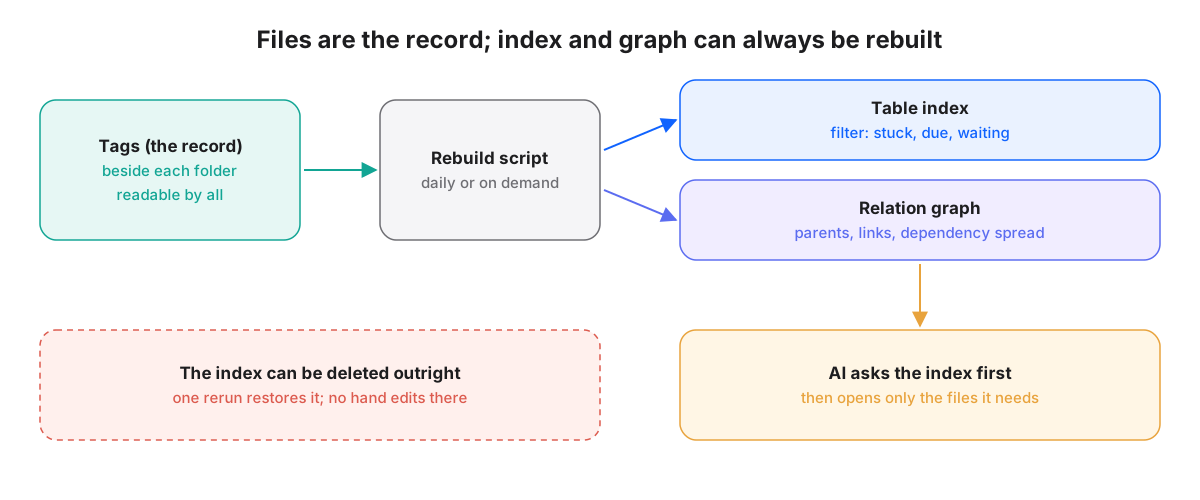
Three things follow. There are never two versions of a fact: change the tag file, and after the next rebuild everything updates together. A broken database needs no rescue, just a rebuild. And people and AI read the same thing, so a different AI tool can read the same tag file too.
With an index, the way AI looks for things changes as well. Instead of opening folders one by one, it asks the index first: "Which cases are waiting on the client and due this week?" The index returns a list, and AI opens only those folders. Reading less leaves the context for the real work.
Relation fields grow a graph
Of the eight groups, relations is different. It does not record a property of the case itself. It records links between cases: which is the parent of which, which child cases were split off, which case points to which.
Read the relation fields of every case and join them up, and you have a knowledge graph. On it you can ask questions a table struggles with. "If this interface component changes, which projects are affected?" Follow the links backwards and you find everything that depends on it. That is dependency spread: one point changes, and its effect travels along the relations.
Some relations we deliberately do not store. Which AI sessions are working on a case is not written in the case's tags; it is looked up in reverse when needed. Storing one direction only means the two sides can never disagree. Contacts and money work the same way: a case stores only their IDs, never the content, which stays in its own record.
The graph also shows isolated points: cases with no parent and no link to any goal. That usually means one of two things — a link was forgotten, or the work has lost its reason to exist. Both are worth a person's glance.
The graph has limits too. To answer "which version is in effect now," being similar or connected on the graph is not enough; you have to check the version status itself. A graph is good at "what is related." It is not good at "which one counts."
Keeping tags current
A tag's worst enemy is going stale. A "next step" written three months ago is worse than none, because it sends people the wrong way. So most tags update automatically, along three paths depending on what kind of tag they are.
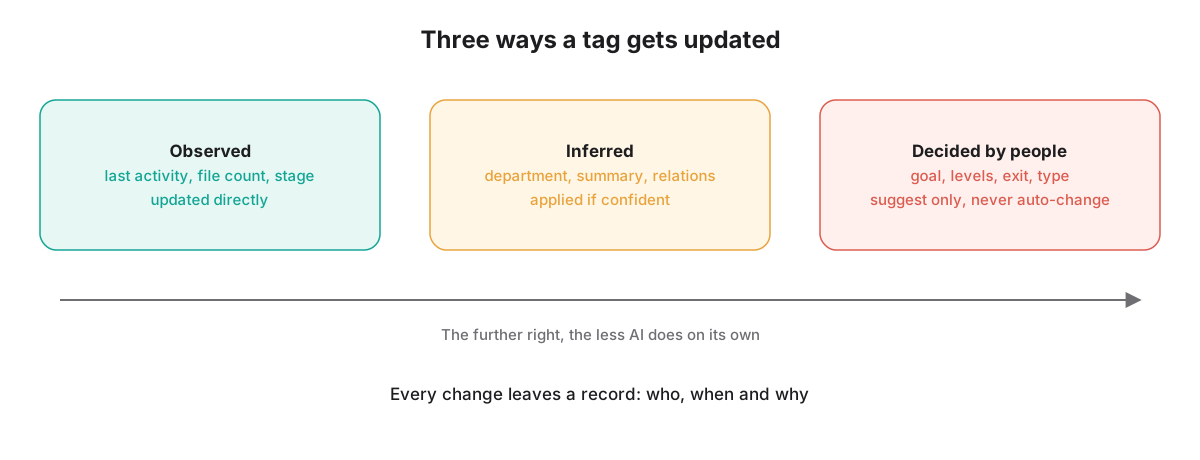
- Observed: last activity, file count, stage, broken links. These are facts, and the program updates them as soon as it sees them.
- Inferred: department, summary, relations to other cases. If AI is confident, it applies the change and reports it afterwards; if not, it offers a suggested value and waits for a person.
- Decided by people: goals, who judges, levels, exits. AI only reminds and suggests; it never changes them on its own.
Type is a special case. It looks inferred, but changing it reshapes the folder's structure and rules. So even when AI is confident, it only files a suggested change, and the owner decides.
In practice it looks like this. You open the overview in the morning. The "to confirm" column says three new folders are waiting for you to confirm their type, and one case's department has already been updated by AI and reported. You approve them one by one and change one to a different type. You never opened a tag file, but your answers were written back to the files, the index was rebuilt, and the next AI to ask gets the new answer.
In short
- Each case carries eight groups of tags, each answering one question. People confirm only the six that are decisions.
- The tag file is the record; the database and graph are rebuilt by a program and can be deleted and regenerated.
- Relation fields joined together form a knowledge graph that traces dependencies and impact.
- Tags update three ways: observed ones directly, inferred ones by confidence, decided ones only by suggestion.