One registry, one gateway: plugging every piece into the governance base
Every piece of infrastructure registers with the governance base, which is both registry and gateway: who may do what, and what was done, is answered in one place only.

Key points
- Every piece of infrastructure registers with the governance base, which is both registry and gateway: who may do what, and what was done, is answered in one place only.
- References may only run in fixed directions. Reading client data, granting yourself permissions, writing rules, storing fact bodies and depending on a project are all forbidden.
- Every request passes six gates in order: identity, default-deny permission, confirmation, execution under a lock, an append-only record and a rate limit. Outside actions add three states, and an uncertain one is reconciled before anything is retried.
Once a company starts letting AI do real work, it quickly grows a set of infrastructure. There is a shared library of interface components, a knowledge base of facts the company has confirmed, a group of AI roles and skills that act, connectors to cloud drives and the customer database, a few machines running schedules, and a set of rules for where data lives and how it is backed up. Each piece makes sense on its own. The trouble is in between them.
Should the interface library know where a client project keeps its files? Are an AI role's permissions written in its own spec, or somewhere else? Can a line of brand positioning from the knowledge base be copied into the rule table? Can a connector decide by itself to send a few more emails today? If every piece answers these questions its own way, six months later nobody can say who actually approved a given action.
This article describes our answer: every piece of infrastructure plugs into one governance base. The governance base plays two roles at once. As a registry it answers "what exists". As a gateway it answers "may this happen". We start with the registry and the directions references may take, then the six gates, and then follow one request from start to finish.
The registry: first answer "what exists"
The registry's job is plain. Every piece of infrastructure, every project and every external system leaves an entry in the governance base: what it is, where its master copy lives, what interface it offers, who is responsible for it, and whether it is running or still under observation. The governance base is itself a piece of infrastructure, and it is also the registry for everything else.
Why register first? Because what is not registered cannot be governed. An unregistered machine or connector leaves nobody knowing where to look when it misbehaves. Registration is not paperwork. It is what every later check compares against.
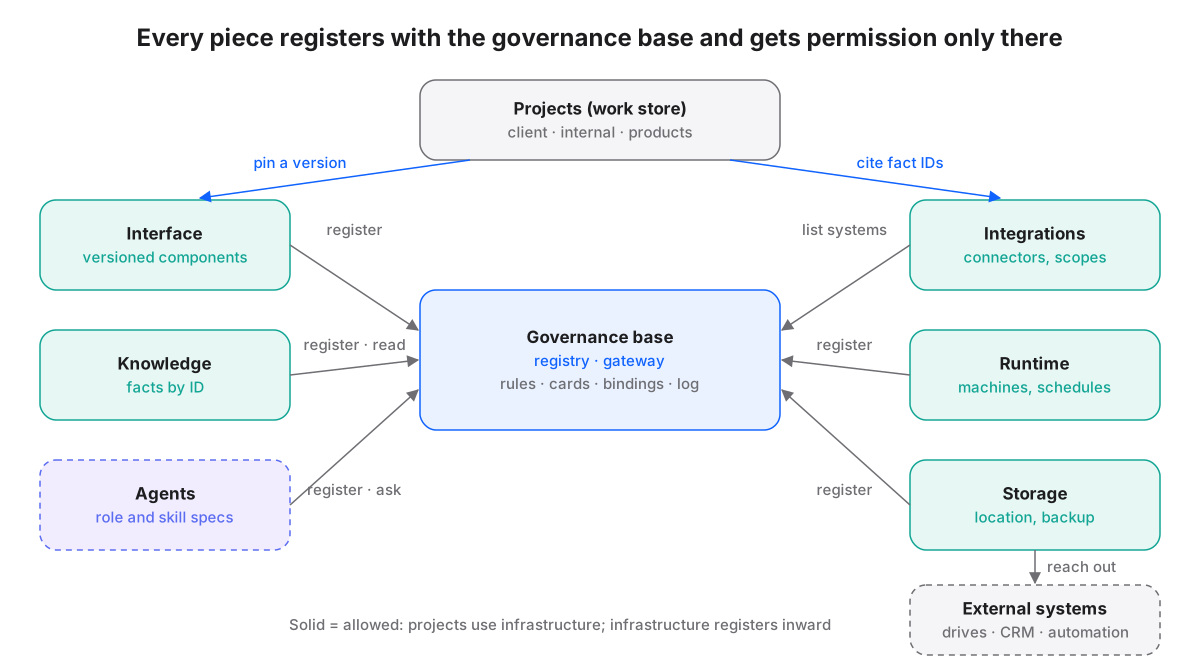
A few things in the figure are worth noticing. First, projects sit at the top. They are the work store, not infrastructure. A project may reference infrastructure, for example by pinning a version of the interface library or citing a fact by its ID, but never the other way round. Second, between each piece of infrastructure and the governance base there are only two relationships: registering and asking for permission. Pieces never grant each other permissions on the side. Third, external systems hang off the integrations piece. The governance base keeps only a list of them, with purpose, owner and whether they hold personal data. It never stores passwords or keys.
The agent infrastructure is drawn with a dashed border because it is still under observation and has not been formally opened. AI roles have draft specs but no complete, auditable way to run yet, so they register and ask for permission like everyone else, and they will be promoted when the conditions are met.
Direction matters more than the reference itself
Connecting things is easy. Keeping them from turning into a tangle afterwards is hard. Our rule is that references may only run in fixed directions. Projects use infrastructure. Infrastructure registers with, and gets permission from, the centre. Knowledge infrastructure hands out fact IDs; others cite the ID and never copy the text.
Direction matters because dependency spreads. If the interface library references a path inside one client project, the library breaks when that project moves, and every product built on the library breaks with it. One line pointing the wrong way turns a local change into a wide failure. When directions are consistent, the blast radius of any change can be worked out by following the arrows.
Five directions that are never allowed
"Keep directions consistent" is too abstract on its own, so we name the five directions most likely to cause trouble and forbid them outright. Each one maps to a specific way things break.
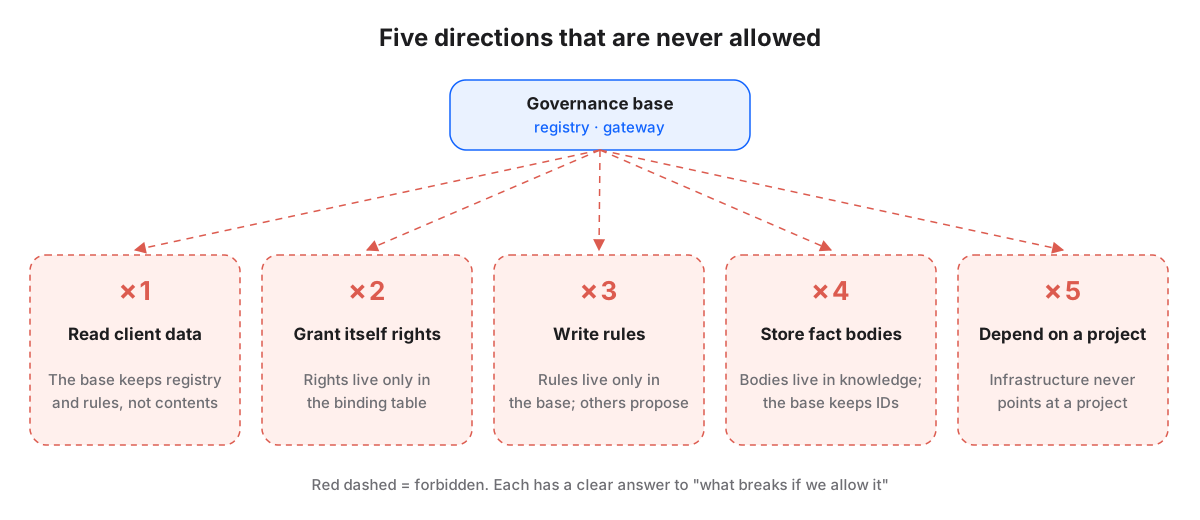
- One: never read client data. The governance base handles registration and rules. It knows a client project exists, where it lives and how sensitive it is, but it does not open its contents. It already holds the largest share of permissions; if it could also read client data, any hole in the gateway would become a data leak.
- Two: never grant yourself permissions. An AI role's or skill's spec may not contain a field saying what it is allowed to do. Permissions live only in a binding table, which is the one place that answers who may do what. Otherwise an AI could raise its own rights just by editing its own spec.
- Three: never write rules anywhere else. Rules live only in the governance base's rule table. Other infrastructure and other AI may only propose changes. If every place could write a few rules, there would be no single version to settle a conflict.
- Four: never store fact bodies. Facts the company has confirmed, such as brand positioning or service definitions, are stored in full only in the knowledge infrastructure. The governance base and every skill keep only the ID. Each copied body is one more version waiting to go stale.
- Five: infrastructure never depends on a project. This is the one most often broken by accident, for example a shared component with one product's path written into it. Projects move, get archived and close. Infrastructure must not fall over with them.
These five are not all at the same stage, and we should say so. Some are already daily automated checks: one scans AI specs for self-granted permission fields, another scans infrastructure text files for hard-coded project paths. The allowed number of violations is zero, and any exception must be declared in the project with an expiry date. The others are still design principles, enforced by review.
The gateway: six gates for every request
The registry answers "what exists"; the gateway answers "may this happen". Every action, whether a command typed on a phone, a schedule at midnight or work triggered by an incoming email, goes through the same entrance and passes six gates in order. This part is running code, not just a spec.
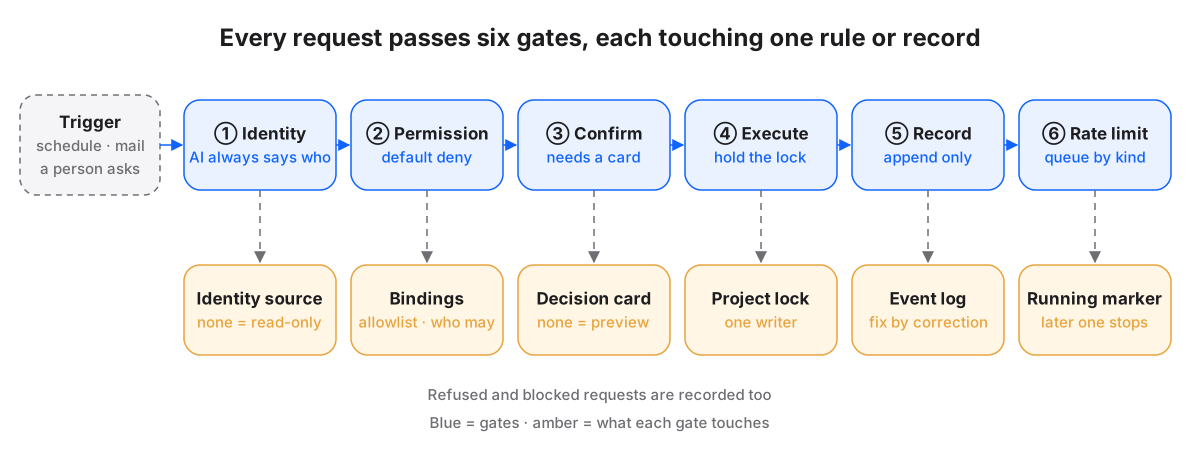
Gate one, identity. Every request must say who it is, and AI is no exception: it names its role and the person it is acting for. Identity is looked up from fixed sources in a fixed order. If none is found, the system does not guess. It treats the request as anonymous and read-only. An anonymous caller can see system health and today's list, but every write is refused with a hint on how to set an identity. Early on, a missing identity defaulted to the founder. We changed that. A default that hands out the highest rights is the most dangerous kind of convenience.
Gate two, permission, default deny. The requested action must be on an allowlist. Anything not on the list is refused, no reason needed. Beyond the list, the binding table is checked to see whether this identity's role may do this. The binding table is the single source of permissions, which is where the "never grant yourself permissions" rule is actually enforced. A refusal writes a security event and stops.
Gate three, confirmation. Actions that change folder structure, such as opening a new project or bringing an existing folder under governance, need a decision card that has been decided: its status is decided and its confirmer is someone with the right. Without a card, the system only allows a preview or dry run, so a person can see exactly what would happen before deciding whether to sign. This gate splits "want to do" and "allowed to do" into two moments.
Gate four, execute while holding the project lock. Before writing to a project, take that project's lock, and release it when done. If two writers try to open a project with the same name at once, the later one fails at the step that creates the folder instead of overwriting the first. If something fails halfway, the system does not delete what was already built. The lock and the partial result stay for a person to judge.
Gate five, record, append only. Each run writes an event: which action, whether it succeeded or how it failed, whether it was a dry run, how long it took. The log can only grow. A mistake is fixed by a correction event that points back to the original, and every entry carries the previous entry's fingerprint, so a quiet edit breaks the chain.
Gate six, rate limit. While an action of a given kind runs, it leaves a "running" marker. A later request of the same kind sees the marker, stops and reports, instead of running at the same time. When a schedule collides with a person's command, the result is a predictable queue, not two writers overwriting each other.
Why one gateway instead of each piece guarding itself? Three reasons. There is one version of the rules, so the interface library never says yes while the knowledge base says no. There is one log, so "what happened then" means looking in one place. And a new piece of infrastructure does not have to reinvent permissions; by registering and asking the gateway, it inherits all of the protection at once.
The cost is real: the gateway becomes a critical point. When it is down, work must be able to fall back to manual mode, and its rules must be reviewable and traceable. That is also why the governance base handles only registration, rules and records, never content. The less it manages, the less can break, and the easier it is to trust.
Events wake things up; they do not authorize
With an event log in place, it is tempting to let events trigger the next step directly. For example, the event "a client email arrived" could make the AI reply straight away.
Our answer is that an event can wake the AI up, but cannot authorize it. The AI that receives an event may look at it, but anything it then does starts again at gate one: say who it is, check permissions, attach a decision card where one is needed. The reason is simple. An event's content comes from outside, and outside content is data, not instructions. If an event could authorize on its own, anyone able to send you an email would effectively hold a key.
An event tells you it is time to look. It never tells you what you are allowed to do.
This rule is currently a spec. The gateway already blocks requests without identity or permission, but the path for an AI woken by an event is not fully built yet, and we do not describe it as live.
Three states for outside actions
Internal writes have locks and records, and mistakes can be corrected. Outside actions are different. A sent email cannot be unsent, a published page has already been seen, a payment has already been taken. So outside actions need one more layer.
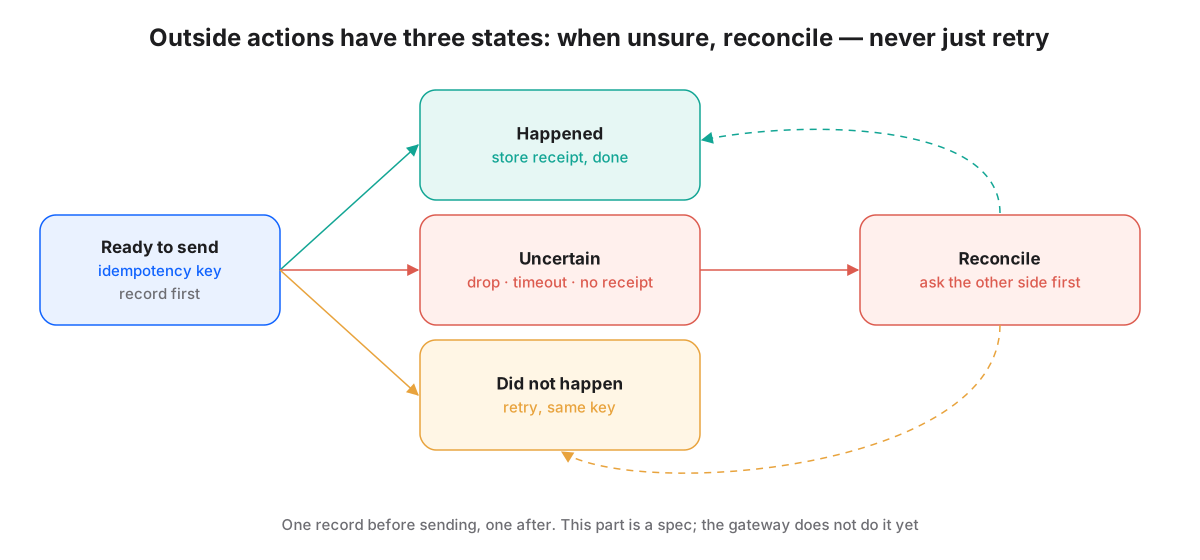
- Ready to send: record an event before sending and create an idempotency key. The same action always uses the same key.
- Happened: the other side returned a receipt. Record it and finish.
- Did not happen: we know for certain it was not sent, for example the other side refused it. Retry with the same key.
- Uncertain: a dropped connection, a timeout, no receipt. This is the dangerous state. The rule is to reconcile first, checking whether the other side actually received it. A direct retry is not allowed.
"Uncertain" gets its own state because this is where the most common incident happens. The network blips, the program resends, and the client gets the same quote twice. Reconciling is slower, but it never turns a glitch into an apology.
Outside actions come with one more rule: an approval is bound to four things, the version, the action, the destination and the deadline. What gets approved is "this version of the quote, to this contact, today", not a vague "you may send". A different version, a different recipient or a passed deadline voids the approval. To be clear, the three states and the four-way binding exist only as a spec today; the gateway does not implement them yet.
Where people appear
With so much handed to the gateway, does the human role disappear? The opposite. People appear in only a few places on purpose, and each appearance carries weight.
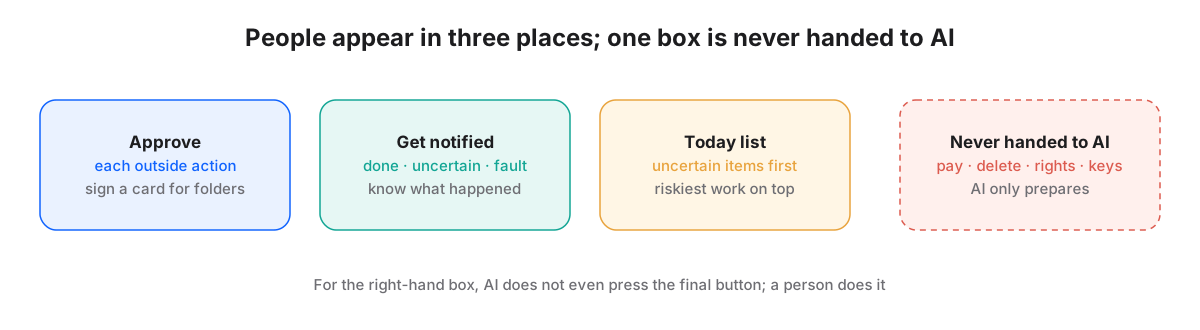
- Approve: each outside action is approved one by one; anything that changes folder structure needs a signed decision card.
- Get notified: people hear about completions, uncertain outcomes and faults, so they know what happened.
- Today list: one list a day, with uncertain items at the top, so the things most likely to go wrong are handled first.
One kind of work is never handed to AI: payment, deletion, changing permissions and entering passwords. AI may prepare the materials, but the final press is a person's. When nobody is around, the system does not decide on its own because there is no one to ask. It steps down instead: outside actions wait in a queue for a person, reversible internal actions go ahead, and irreversible ones stop.
Walking one request end to end
Here is one common case, all the way through. The founder says on a phone: "Open a project for the new client, then send a welcome email to their contact." A project-manager AI role takes it.
- Identity: the AI names its role and says it is acting for the founder. The identity is found; pass.
- Permission: opening a project is on the allowlist, and the binding table lets this role open projects within its scope. Pass.
- Confirmation: opening a project creates folders, so a decision card is needed. The AI runs a preview and produces a card listing the name, type, location, default data level and any existing projects with similar names, then stops and waits.
- The founder reads the preview and replies "yes". The decision card records the confirmer and the decision. The AI resubmits with the card, and gate three passes.
- Execute: the AI takes the new project's lock, creates the first level of folders and the identity file for its type, releases the lock, and registers the project in the registry.
- Record: the event log gains one entry, "project opened", with the path and the fingerprints of the identity file before and after.
- Rate limit: if a schedule happens to be running the same kind of action, the later one stops and reports rather than writing at the same time.
- The welcome email is an outside action. It goes through the six gates again, plus a one-off approval bound to this version of the email, this recipient and a deadline. An event is recorded before sending, with an idempotency key. The send times out and lands in "uncertain". The AI does not resend. It reconciles, finds the email was received, records it as happened and notifies the founder.
Notice what did not happen in this example. The AI read no existing client data, changed none of its own permissions, wrote no client name into a shared component, and did not resend after a timeout. Those things that did not happen are exactly why the directions and gates exist. The three-state handling in the last step is a spec today; for now a person sends the email and confirms it.
In short
- The governance base is both registry and gateway: what is registered can be governed, and permissions are answered only by one binding table.
- References run in fixed directions: projects use infrastructure, infrastructure registers inward. The test is whether this end survives if the other end disappears.
- Five forbidden directions: reading client data, granting yourself permissions, writing rules elsewhere, storing fact bodies and depending on a project. Some are checked automatically every day; others rely on review.
- Every request passes six gates: identity, default deny, decision card, execution under a lock, an append-only record and a rate limit. Refusals are recorded too.
- Events wake but do not authorize. Outside actions have three states, and uncertain ones are reconciled first. Both are specs today.
- People appear to approve, to be notified and to read today's list. Payment, deletion, changing permissions and entering passwords are never handed to AI.